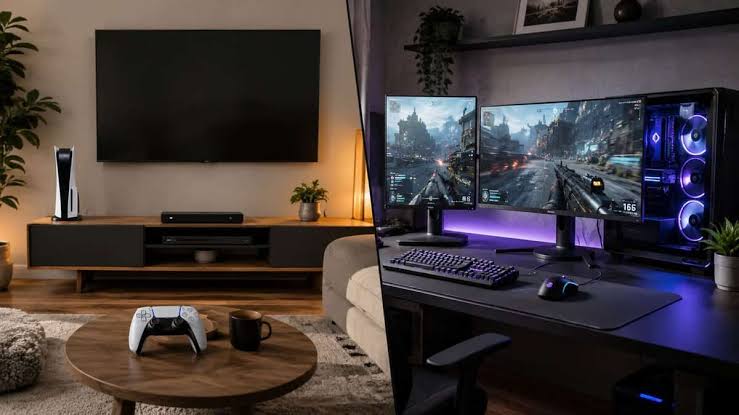
Choosing between a console and a PC gaming setup is one of the biggest decisions every gamer faces. Both platforms offer incredible gaming experiences, but they cater to different types of players, budgets, and expectations. While some gamers prefer the simplicity of a console, others value the flexibility and performance of a gaming PC.
The right choice depends on several factors, including your budget, favorite game genres, desired graphics quality, upgrade plans, and whether you want your system to serve purposes beyond gaming.
This guide compares console and PC gaming setups across the most important categories to help you decide which platform is the better fit for your gaming style.
Why Your Gaming Setup Matters
Your gaming setup affects more than just visual quality. It influences comfort, performance, multiplayer experiences, upgrade options, and long-term value.
Before making a purchase, consider how you plan to use your system. Some players simply want to relax and play after work, while others stream gameplay, create content, or compete in online tournaments.
Understanding your priorities makes the decision much easier.
Console Gaming Setup Overview
A console gaming setup is designed to provide a simple and straightforward gaming experience. Modern consoles are optimized for gaming, requiring very little configuration before you can start playing.
Typical Console Gaming Setup
Most console setups include:
- Gaming console
- Television or gaming monitor
- Wireless controller
- HDMI cable
- Internet connection
- Gaming headset (optional)
- External storage (optional)
Once everything is connected, you’re usually ready to play within minutes.
Advantages of Console Gaming
Console gaming offers several benefits:
- Easy to set up
- Minimal maintenance
- Exclusive games
- Consistent performance
- Comfortable couch gaming
- Lower initial cost
- User-friendly interface
Because every console uses similar hardware, developers can optimize games effectively, resulting in stable performance without requiring hardware upgrades.
Disadvantages of Console Gaming
There are also limitations:
- Limited hardware upgrades
- Less graphics customization
- Paid online subscriptions for many multiplayer games
- Fewer customization options
- Restricted mod support
PC Gaming Setup Overview
A gaming PC offers greater flexibility and performance than a console. It allows players to customize nearly every aspect of their gaming experience, from graphics settings to hardware components.
Typical PC Gaming Setup
A standard gaming PC setup often includes:
- Gaming desktop or laptop
- Monitor
- Mechanical keyboard
- Gaming mouse
- Speakers or headset
- Gaming desk
- Ergonomic chair
- Mouse pad
- Optional RGB lighting
Although the initial setup takes more time, it provides significantly more customization options.
Advantages of PC Gaming
PC gaming provides numerous benefits:
- Higher frame rates
- Better graphics options
- Hardware upgrades
- Extensive game library
- Keyboard and mouse support
- Excellent multitasking
- Easier content creation
- Broad compatibility with accessories
Many modern gaming PCs can also handle video editing, programming, graphic design, and streaming, making them useful beyond gaming.
Disadvantages of PC Gaming
Potential drawbacks include:
- Higher upfront cost
- More complicated setup
- Occasional driver updates
- Hardware compatibility considerations
- Greater maintenance requirements
Performance Comparison
Performance is one of the biggest differences between consoles and gaming PCs.
Console Performance
Modern consoles deliver impressive performance considering their price. Most current-generation titles run smoothly, with many supporting high resolutions and stable frame rates.
Because developers optimize games specifically for console hardware, players generally experience consistent performance without adjusting graphics settings.
Console performance is ideal for gamers who want a reliable experience with minimal effort.
PC Performance
Gaming PCs offer much greater performance potential.
Depending on your hardware, you can enjoy:
- Higher frame rates
- Ultra graphics settings
- Faster loading times
- Better texture quality
- Wider graphics customization
- Support for high-refresh-rate monitors
High-end gaming PCs often outperform consoles, especially in competitive games where higher frame rates can improve responsiveness.
Cost Comparison
Budget plays a major role when choosing between a console and a gaming PC.
Console Costs
Consoles generally have a lower initial purchase price. A typical setup requires:
- Console
- One controller
- Display
- A few games
Optional accessories such as additional controllers, charging stations, or expanded storage can increase the overall cost, but the entry price remains relatively affordable.
PC Costs
Gaming PCs require a larger investment, especially if you’re building a complete setup from scratch.
Common expenses include:
- Computer
- Monitor
- Keyboard
- Mouse
- Headset
- Desk
- Chair
- Operating system (if applicable)
While the upfront cost is higher, PCs often provide better long-term value because individual components can be upgraded instead of replacing the entire system.
Graphics and Visual Quality
Visual quality depends on both the game’s optimization and your hardware.
Consoles aim to provide a balanced experience with attractive graphics and stable performance across all users.
Gaming PCs, however, allow players to fine-tune nearly every graphical setting. If equipped with modern hardware, a PC can deliver higher resolutions, smoother frame rates, enhanced lighting effects, and improved texture quality.
For players who prioritize the best possible visuals, a gaming PC offers more flexibility and room for improvement.
Ease of Use
If convenience is your top priority, consoles have a clear advantage.
Simply connect the console to your TV or monitor, install updates, and start playing. There is little need to worry about hardware compatibility, driver updates, or adjusting graphics settings.
Gaming PCs require more initial setup and occasional maintenance, including software updates, driver installations, and hardware upgrades. However, many players appreciate this level of control because it allows them to optimize performance according to their preferences.
For beginners seeking simplicity, consoles are often the easier choice. For enthusiasts who enjoy customization, a gaming PC offers unmatched flexibility.
Game Library Comparison
One of the biggest factors when choosing between a console and a PC is the variety of games available. Both platforms have excellent libraries, but they differ in important ways.
Console Game Library
Consoles are known for their exclusive titles that are often unavailable on other platforms for months or even years. These exclusives are one of the main reasons many players choose a particular console.
Benefits of console game libraries include:
- Exclusive first-party games
- Optimized performance
- Easy digital game purchases
- Physical game discs (on supported models)
- Family-friendly gaming options
If your favorite games are exclusive to a specific console, that alone may influence your decision.
PC Game Library
PC gamers enjoy access to one of the largest game libraries available. In addition to modern releases, PCs support thousands of older games, indie titles, strategy games, simulations, and community-created modifications.
Advantages include:
- Huge selection of games
- Frequent digital sales
- Early access releases
- Independent developer titles
- Extensive mod support
- Backward compatibility with many older games
For players who enjoy exploring different genres, PC gaming offers unmatched variety.
Upgradeability
Future upgrades are where gaming PCs have a significant advantage.
Console Upgrades
Most consoles have fixed hardware. While you can usually add more storage or purchase additional accessories, the processor and graphics hardware cannot be upgraded.
When a new console generation launches, many players eventually replace their entire system.
PC Upgrades
Gaming PCs are designed with upgrades in mind.
Common upgrades include:
- Graphics card
- Processor
- Memory (RAM)
- Storage drives
- Cooling systems
- Power supply
- Monitor
This flexibility allows you to improve performance over time instead of buying a completely new machine.
Multiplayer Experience
Online gaming has become one of the most important aspects of modern gaming.
Console Multiplayer
Console multiplayer is generally simple and user-friendly. Matchmaking, party systems, and voice chat are built directly into the operating system.
Many multiplayer games require a paid subscription for online access, depending on the platform.
Advantages
- Easy matchmaking
- Stable online experience
- Built-in party chat
- Optimized servers
PC Multiplayer
PC gaming offers a wide range of multiplayer experiences, from competitive esports to massive online role-playing games.
Many online games provide free multiplayer access without requiring a platform-wide subscription.
Advantages
- Large competitive communities
- Dedicated servers for many games
- Better communication tools
- Wide selection of multiplayer genres
Competitive players often prefer PC gaming because keyboard-and-mouse controls provide greater precision in many game types.
Controls and Accessories
Your preferred input device can greatly influence your gaming experience.
Console Accessories
Most console gamers use wireless controllers designed for comfort and simplicity.
Popular accessories include:
- Extra controllers
- Charging docks
- Gaming headsets
- Racing wheels
- Flight sticks
- External storage
Controllers work particularly well for racing games, sports games, and action-adventure titles.
PC Accessories
PC gaming offers significantly more customization.
Popular accessories include:
- Mechanical keyboards
- Gaming mice
- Ultra-wide monitors
- High-refresh-rate displays
- Stream decks
- Professional microphones
- Webcams
- RGB lighting
- Custom controllers
Because PCs support a wider range of peripherals, players can create a setup tailored to their specific needs.
Streaming and Content Creation
Many gamers today also create content for platforms like YouTube or Twitch.
Console Streaming
Modern consoles include built-in streaming and recording features that make sharing gameplay relatively easy.
However, advanced editing and professional production usually require additional hardware or a computer.
PC Streaming
Gaming PCs are the preferred choice for content creators.
Benefits include:
- Professional streaming software
- Video editing
- Graphic design
- Live broadcasting
- Multi-monitor workflows
- Audio production
If you plan to stream regularly or create gaming videos, a PC offers much greater flexibility.
Productivity Beyond Gaming
Gaming isn’t the only reason many people invest in a computer.
Console Productivity
Consoles are primarily designed for entertainment. While they support web browsing and media streaming, productivity features are limited.
Tasks such as programming, office work, photo editing, and professional content creation are not practical on most consoles.
PC Productivity
A gaming PC can also function as a complete workstation.
You can use it for:
- School assignments
- Remote work
- Programming
- Video editing
- Graphic design
- Music production
- 3D modeling
- Photo editing
For users who need one device for both work and gaming, a PC provides significantly greater value.
Long-Term Value
When comparing long-term costs, the answer isn’t always straightforward.
A console typically has a lower purchase price, making it attractive for gamers on a budget. However, purchasing a new console every generation and paying for online subscriptions can increase long-term expenses.
A gaming PC costs more upfront but can remain relevant for many years through hardware upgrades. Replacing individual components, such as the graphics card or storage drive, is often less expensive than buying an entirely new system.
Additionally, PC gamers frequently benefit from discounted digital game sales, free online multiplayer in many titles, and extensive backward compatibility.
If you plan to game for several years and appreciate flexibility, a gaming PC often provides better long-term value despite its higher initial investment.
Who Should Choose a Console?
A console is an excellent choice if you:
- Want an affordable gaming system.
- Prefer plug-and-play simplicity.
- Enjoy exclusive console games.
- Like relaxing on a couch with a controller.
- Don’t want to upgrade hardware regularly.
- Want a straightforward gaming experience with minimal maintenance.
Who Should Choose a Gaming PC?
A gaming PC is the better option if you:
- Want the highest possible graphics quality.
- Play competitive multiplayer games.
- Plan to stream or create gaming content.
- Need a computer for work, school, or creative projects.
- Enjoy upgrading and customizing hardware.
- Want access to a massive game library and mod support.
A gaming PC requires a larger investment, but it rewards users with greater performance, flexibility, and long-term versatility.
Console vs. PC Gaming Setup Comparison
| Feature | Console Gaming | PC Gaming |
|---|---|---|
| Initial Cost | Lower | Higher |
| Performance | Optimized and consistent | Depends on hardware, can be significantly higher |
| Graphics Settings | Limited customization | Fully customizable |
| Upgradeability | Very limited | Excellent |
| Ease of Setup | Very easy | Moderate |
| Maintenance | Minimal | Regular updates and occasional hardware upgrades |
| Exclusive Games | Strong first-party exclusives | Massive game library with mods and indie titles |
| Multiplayer | Simple and integrated | Flexible with larger competitive communities |
| Productivity | Limited | Excellent for work and content creation |
| Long-Term Value | Good | Excellent with component upgrades |
Which Gaming Setup Should You Buy?
There’s no universal winner because the best gaming setup depends on your priorities.
Choose a Console If You:
- Have a limited budget.
- Want a simple plug-and-play experience.
- Prefer gaming from your couch.
- Love exclusive console titles.
- Don’t want to worry about hardware upgrades.
- Play mostly for entertainment after work or school.
A console offers excellent value for casual gamers who want reliable performance without the complexity of managing a computer.
Choose a Gaming PC If You:
- Want maximum graphics performance.
- Play competitive online games.
- Stream gameplay or create YouTube content.
- Need a computer for work, studying, or creative tasks.
- Enjoy customizing your hardware.
- Plan to upgrade your system over time.
Although the initial investment is higher, a gaming PC offers greater flexibility and can adapt to your needs for years.
Buying Tips Before You Decide
Regardless of which platform you choose, keep these practical tips in mind:
1. Set a Realistic Budget
Your budget should include more than just the main device. Remember to account for accessories such as monitors, headsets, controllers, keyboards, mice, storage upgrades, and comfortable seating.
2. Consider the Games You Play Most
Make a list of the games you enjoy or plan to play. If several of your favorites are only available on one platform, that may make your decision much easier.
3. Think About Future Needs
If you’re planning to stream, edit videos, or use your setup for work or school, investing in a gaming PC may provide greater long-term value.
4. Prioritize Comfort
A comfortable chair, properly positioned monitor, and ergonomic desk setup can improve your gaming experience more than many expensive accessories.
5. Buy Quality Accessories
Reliable keyboards, mice, controllers, headsets, and monitors often last for years. Choosing quality peripherals can enhance both comfort and performance.
Frequently Asked Questions
1. Is PC gaming better than console gaming?
Neither platform is objectively better. Gaming PCs offer higher performance, upgradeability, and versatility, while consoles provide a simpler, more affordable gaming experience with minimal setup.
2. Which option is more affordable?
Consoles generally have a lower upfront cost, making them ideal for budget-conscious gamers. Gaming PCs require a larger initial investment but may provide better long-term value through hardware upgrades and broader functionality.
3. Can a gaming PC replace a console?
For many users, yes. A gaming PC can play a wide variety of games while also handling work, content creation, streaming, and other everyday tasks. However, some console-exclusive games may not be available on PC.
4. Which platform is better for competitive gaming?
Gaming PCs are typically preferred for competitive gaming because they support higher frame rates, lower input latency, customizable controls, and precise keyboard-and-mouse input.
5. Which platform is easier for beginners?
Consoles are generally easier for beginners. Their straightforward setup, consistent hardware, and user-friendly interface allow players to start gaming quickly without worrying about compatibility or system configuration.
Final Verdict
Both console and PC gaming setups offer exceptional experiences, but they cater to different audiences.
If you value simplicity, affordability, and a hassle-free gaming experience, a console is an excellent choice. It’s easy to set up, requires little maintenance, and delivers reliable performance for a wide range of games.
On the other hand, if you’re looking for maximum performance, extensive customization, superior graphics, and a device that can handle gaming alongside work or creative projects, a gaming PC is the stronger long-term investment.
Before making your decision, think about your budget, the games you want to play, your interest in upgrading hardware, and whether you need your setup for more than gaming. Choosing the platform that aligns with your goals will provide the best value and ensure years of enjoyable gameplay.
Whether you choose a console or a gaming PC, investing in a comfortable, well-organized gaming setup and quality accessories will enhance your overall experience. Focus on building a setup that fits your needs rather than simply chasing the most expensive hardware.